The Resource Lab is your central hub for reliable, in-depth information. Our extensive database is designed to provide you with the most relevant resources and methodologies.
As a result, we put together this guide – part of the ‘Introduction to Investigative Journalism’ program implemented collaboratively in 2024 – and recruited some of the top investigative journalists from around the world to write it.
The chapters are by: Jelena Cosic (ICIJ), Wahyu Dhyatmika (Tempo), Emilia Díaz-Struck (GIJN), Mariam Elba (ProPublica), Will Fitzgibbon (The Examination), Brant Houston (University of Illinois), Karol Ilagan (University of the Philippines), Purity Mukami (OCCRP), Miranda Patrucic (OCCRP), Runa Sandvik (Granitt), Hamadou Tidiane Sy (Ouestaf News), Shereen Youssef (BBC Verify), Marina Walker (Pulitzer Center), and Margot Williams (The Intercept).
The guide was edited by Nikolia Apostolou, Jabeen Bhatti, John Dyer, Martha Hamilton, Reed Richardson, and Alexa van Sickle. Chapters were fact-checked by Jabeen Bhatti, Martha Hamilton, and Katrina Janco.
Legal advice was provided by The Cyrus R. Vance Center for International Justice.
The project wouldn’t have been possible without the help and support of GIJN and iMEdD staff:
From GIJN:
Resource Center Director: Nikolia Apostolou, Executive Director: Emilia Díaz-Struck, Regional Editors and Associate Editors: Aïssatou Fofana, Maxime Domegni, Benon Oluka, additional assistance: Leonardo Peralta, Illustrations: Smaranda Tolosano
From iMEdD:
Co-founder and Managing Director: Anna-Kynthia Bousdoukou, Head of the Incubator and Ideas Zone: Dimitris Bounias, Project Managers: Nikolas Aronis, Nota Vafea, and Katerina Voutsina, Art Director: Evgenios Kalofolias
The guide was published simultaneously in English and Greek.
The figures are grim for our colleagues around the world. Since 1992, 978 journalists have been killed, according to the Committee to Protect Journalists. More than 60 percent have been murdered with impunity; that is, no killer was ever brought to justice. And today, 232 journalists are in prison worldwide, many for doing what would be considered routine reporting in much of the world.
The problem, moreover, appears to be growing worse. Data from CPJ and the International Press Institute indicate that the killings– after staying fairly constant during the 1990s, jumped by more than 30 percent over the previous decade, according to a 2012 report by the Center for International Media Assistance. Behind the upsurge in dead journalists: the wars in Iraq and Afghanistan and attacks in Mexico and the Philippines.
Although high profile killings of Western journalists — like Marie Colvin or Daniel Pearl — get international attention, the vast majority of fatalities are staff members of local media. And the killings are the tip of the iceberg. Beatings, kidnappings, imprisonment, and threats against journalists are far more numerous, and can be just as effective at silencing them.
Threats come from many directions: from drug cartels or rebel groups; autocratic governments or ethnic enemies; stray bullets or terrorist bombs. Indeed, it may be the widely disparate nature of the threats that makes a “one size fits all” solution so elusive.
Half a dozen professional organizations are actively engaged in the problem, as are representatives of major multilateral organizations, among them the United Nations and the Organization for Security and Cooperation in Europe.
As part of the Global Investigative Journalism Network’s series of Resource Pages, we are publishing this brief guide to the major international press freedom and safety groups that concern themselves, in some fashion, with the issue of violent attacks on journalists. It is reprinted from Empowering Independent Media, published by the Center for International Media Assistance.
Article 19: Based in London. Article 19 monitors, researches, publishes, lobbies, campaigns, sets standards and litigates on behalf of freedom of expression wherever it is threatened. Its work includes campaigns to protect journalists from threats to their lives, families and livelihoods.
Committee to Protect Journalists (CPJ):Based in New York. Founded in 1981 by U.S. foreign correspondents concerned about “the often brutal way” local journalists were being treated in other countries. Managed by a board of directors made up of professional journalists, CPJ produces annual country reports, conducts international missions, and maintains its Impunity Index, among many other aggressive activities.
Global Journalist Security:Founded in 2011, it is a Washington-based consulting firm that offers security training and advice to media workers, citizen journalists, human rights activists, and NGO staff. The group also trains security forces in developed nations as well as in emerging democracies that aspire “to meet international press freedom and human rights standards how to safely interact with the press.”
Inter American Press Association (IAPA): Based in Miami, FL. Founded in the late 1940s; now includes 1,400 member publications from Canada to Chile. It monitors and advocates for press freedom throughout the hemisphere; special programs include a Rapid Response Unit deployed when a journalist is killed, twice-yearly reports on press freedom issues in each country, and publication of a “Risk Map” to guide journalists working in the most dangerous countries. IAPA also operates its own separate “Impunity Project,” with detailed information on journalist murders throughout the region.
International Federation of Journalists (IFJ): Based in Brussels. Launched, in its modern form, in 1952, IFJ describes itself as the world’s largest association of journalists. It monitors press freedom issues and advocates for journalists’ safety and was a founder of the International News Safety Institute.
International Freedom of Information Exchange (IFEX): Perhaps the most visible role of this Toronto-based organization is as a source of information; it operates what it calls “the world’s most comprehensive free expression information service,” with a weekly e-mail newsletter, a regular digest of articles related to press freedom, and “action alerts” from members around the globe. It has more than 90 member organizations in more than 50 countries. In 2011it established November 23 as International Day to End Impunity.
International News Safety Institute (INSI). Based in Brussels. Created in 2003 as a result of an initiative by the IFJ and IPI, it describes itself as “a unique coalition of news organizations, journalist support groups and individuals exclusively dedicated to the safety of news media staff working in dangerous environments.” It conducts training, issues safety tips and manuals, and monitors journalists’ casualties of all kinds, whether violent attacks or accidents.
International Press Institute (IPI): Created in 1950, the Vienna-based IPI calls itself “a global network of editors, media executives and leading journalists.” A founder of INSI, it monitors press freedom with an annual World Press Freedom Review, conducts regular missions to countries where it is at risk, and tracks attacks on journalists.
Reporters Without Borders (Reporters Sans Frontières, or RSF): Founded in 1985 and based in Paris, RSF gathers information on press freedom violations and sponsors international missions as needed. Among other activities it provides financial assistance to journalists or news organizations to help defend themselves, and to the families of imprisoned journalists, and works to improve the safety of journalists, especially in war zones.
Using data in journalism is not new. But over the past decades, it has come a long way. In the 1960s, Philip Meyer began experimenting with the use of computers to process data for various projects at the Detroit Free Press. He also introduced the use of social science methods in reporting, later detailed in his 1973 book, “Precision Journalism: A Reporter’s Introduction to Social Science Methods.”
If an organization or a public agency publishes a figure (such as a statistic), asking for the data behind it could also be a way of accessing a dataset.
Over time, more journalists started to follow Meyer. In 1989, with the support of the Missouri School of Journalism in the United States, Investigative Reporters and Editors (IRE) started the National Institute for Computer-Assisted Reporting program. From then on, journalists began to receive training on how to use data in their investigations, or even create investigations from data.
In the ensuing decades, as the use of the internet spread and increasing amounts of data emerged, journalists began to use the term “data journalism” to describe reporting (as well as investigations) in which data gathering and analysis was a key part of the process, helping to uncover systemic issues, identify patterns as well as outliers, while reporting stories of public interest.
As a result, computer-assisted reporting became a global practice, as former IRE executive director Brant Houston noted: Journalists worldwide, individually or as part of regional or even international organizations, began to use it to conduct investigations. At the same time, universities and organizations around the world, such as the Global Investigative Journalism Network, began to offer training on data journalism.
Now, 60 years after Meyer began experimenting with computers, many investigative projects are the result of processing large numbers of records and conducting data analyses with computers, combined with traditional reporting techniques such as speaking to human sources, reporting on the ground, and accessing public records and documents to produce stories of public interest.
Where to Find Data
Data is everywhere. Because of advances in technology over the past decades, people can store and process more information than ever before. Meanwhile, data can come in aggregate or granular form. Of course, journalists often prefer to obtain granular data so it can be analyzed from all angles. Even so, that’s not always the case.
Still, many governments are embracing making data public. Here are some sources to start with:
Business registries
Court records
Property registries (brick and mortar, intellectual)
Official gazettes. These are public in most jurisdictions
Scraped public databases from government or NGO websites. (However, make sure you familiarize yourself with the legalities of the jurisdiction or the companies that host the data, as some have restrictions or special considerations in regard to scraping.)
Mining concessions. Even opaque countries such as the DRC and Burkina Faso publish mining information through systems that manage land rights and restrictions.
Updates from government officials and law enforcement through their social media, websites, and official channels, like the example in this link.
International organizations like the United Nations
If an organization or a public agency publishes a figure (such as a statistic), asking for the data behind it could also be a way of accessing a dataset.
Some examples of publicly available datasets include:
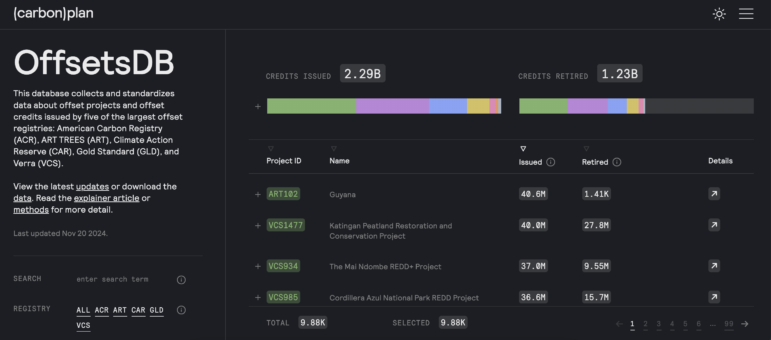
Carbonplan’s Offsets database was designed to make it simpler to investigate carbon offsets and credits and collects data from five of the biggest offset registries. Image: Screenshot, OffsetsDB
The Process
Data journalism is more than just producing charts and infographics. It is also more than just working with structured data in spreadsheets. It is using data to uncover what has been hidden and drive the reporting to create a story with impact.
To use data in your stories effectively, first ask yourself:
What is the nature of the source of the data: Where and how is the data stored?
Is the data structured or unstructured?
What is the focus of the story, and in what format will it be told?
What is the capacity of your team?
What data is available? If none is, can it be created?
Then get busy:
Get the data. Once an idea has proved worth pursuing, the next step is to obtain the data. Journalists get data from a leak of a dataset or documents, from initiating FOIA requests, from human sources, from programming to scrape data from documents or web pages, or from extracting it from PDFs and other image documents. Then comes the task of transforming it all into structured data that can be easily analyzed.
In some cases, journalists may need to create their own dataset if it doesn’t already exist in a structured format — via documents or other sources, for example.
Understand the nature of the data. Ask who created the data, in other words, determine the source of the data, validate their credentials, and assess their credibility. Read the documentation behind the data source to figure out how the data was gathered. Also determine if the data is from a primary dataset or a secondary dataset created from other data sources. What does the data contain (understand the variables, what they represent, and how they are stored). Determine if the data you have is the full dataset or only a portion.
Afterward, try to understand what questions the data you have can answer. Pay attention to what is missing that may have to be filled in by additional data sources. Explore if there is another dataset you would like to obtain to enhance the original set or to compare it with.
Verify the data. Make sure that the data you have obtained is authentic and can be confirmed. Data can be verified by cross-referencing it with other datasets, checking other documents, and speaking to experts. Later in the reporting process, journalists should contact the individuals or entities directly mentioned in the datasets for comment and verification.
When working with data you may face challenges such as data accuracy, completeness, and inconsistency. It’s critical to check if there are any issues with the data, and whether the information is not authentic, outdated, or incomplete. Otherwise, your story may rest on a house of cards.
Document and safeguard the data. If you end up restructuring the data, remember to make a README file, known as a document of instructions, about the data and your methodology. Keep notes of your processes while working with the data. This will help to reduce errors. Keep a copy of the original data — in case of an error, it’s possible to trace it to its origin.
Also, determine who is working with the data. Depending on the sensitivity of the data, it’s important to decide who will access the data and how it will be shared. Data can be stored in folders, on a Google Drive, via a flash disk (if too sensitive to store on the internet), via databases e.g. shareable sql databases or using advanced tools like Aleph, Datashare, NINA, etc.
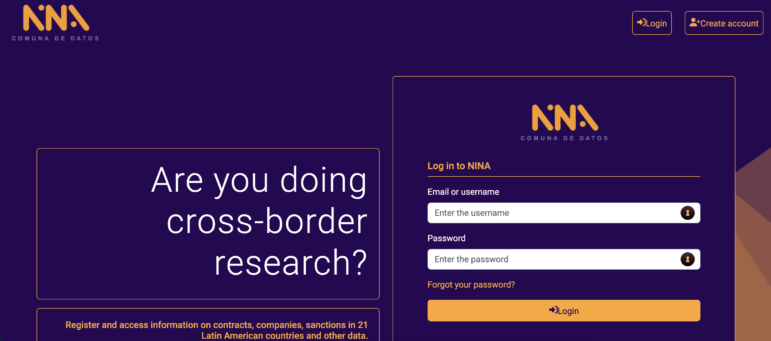
NINA, the data platform of the Latin American Center for Investigative Journalism (El CLIP). It connects open databases to simplify finding connections between companies and individuals contracted by Latin American governments. Image: Screenshot, NINA
The Organized Crime and Corruption Reporting Project (OCCRP) and the International Consortium of Investigative Journalists (ICIJ) usually share data with every journalist working on a project to facilitate efficient collaboration. Still, these organizations have strict protocols determining who can access a dataset to avoid putting sources or reporters at risk, while also ensuring everyone with access has all the information and context necessary to understand the dataset completely. In other words, only share the data with those who must have access to it.
Analyze the data for insights. Once you have understood the data and have shared it with other collaborators, it’s time for happy digging. Always treat data the way you treat human sources — interview the data. Ask yourself, what questions can the data answer, and document how you arrive at those answers:
Keep a data diary of the steps taken to arrive at a value or insight. This will help during fact-checking or if you are asked questions by editors — or lawyers.
Also, use self-referencing and reproducible processes to answer questions later. These could include the use of Excel formulas instead of copy-pasting data; the use of programming codes; the use of a GitHub repository or other methods to keep track of the work.
Record your findings in a way that you and other team members can follow easily. Develop systematic methods to store your calculations, for example, via spreadsheets, dashboards, Python code, or a wiki page.
As part of the analysis, it is possible to cross-reference the information with other datasets. For example, cross-referencing data from entities registered in offshore jurisdictions that appeared in the Pandora Papers with data from land registries in the United Kingdom, France, and the United States (California, Miami, and other states) helped uncover many properties secretly owned by politicians and public figures during the investigative collaboration between the ICIJ and more than 150 media partners.
6. Check your findings with additional reporting. Data analysis must be proofed to ensure that the findings make sense. These need to be reviewed against available laws and regulations, or even past research and reporting. Talk to experts and check your analysis with your colleagues.
Then ask yourself:
Does the data expose any wrongdoing (money laundering, corruption, tax evasion, environmental violations, or other crimes)?
Are there any problems with the validity of the data?
Does the data contain new information?
Does the data help illuminate a systemic issue?
Is there a surprising outlier in the data that could become an important story?
Finally, as the saying goes, “if you torture the data long enough, it will confess to anything.” Statistics can be manipulated to support any conclusion. Avoid this.
7. Plan for publication. Once you have completed your analysis, plan time to fact-check the results of your data work, write the story, and review that the data is presented in the right context. As with other investigative pieces, schedule a legal review and allocate time for production. Are you planning to publish a visualization or an interactive with your story? Include that in your plan too.
From the Data to the Story
A data story can start the same way other stories do: during the course of reporting another story, a leak, or even observation – some issues of public concern can also drive the production of data that lead to stories.
In these cases, data often drives the stories.
Still, while combining data reporting with traditional reporting can produce very powerful results, it’s important to keep in mind the human component and the public interest. Why would the audience be interested in the story? What systemic issue is it uncovering? Who is affected by that issue?
From data to the story: a checklist
1. Identify your story angle. After analyzing data, you may get overwhelmed by the findings and also have numerous angles to choose from to pursue. Thinking about the pitch might help narrow down the best angle to choose.
If you are still lost, talk to your colleagues or your editors. Fresh eyes can help narrow down the best angle to choose, produce a new one and get valuable feedback.
2. Storyboarding and story planning
Keep in mind: Audiences don’t always care about raw data so it takes careful and creative storytelling and visual presentation for the data to make sense.
Mapping the findings into a storyboard helps organize and define the aspects of a good story such as the characters, the conflict, the plot, the structure, etc. What is the engaging storyline in your key findings? Map it out.
3. Write the pitch. Lay out where the data is leading you so others including editors can understand it and get on the same page.
4. Report the data. Keep in mind that great data stories are also accompanied by great reporting. Here’s an example of where the reporting became the story from the data: Imagine you are analyzing housing projects in your country with a deep look at the government’s investment and the companies contracted to build the housing. While visiting the sites of the housing projects, as dictated by the data, you find there are no buildings. In this case, the discrepancy between the data and what happens in the field becomes the story.
5. Write the story. The biggest challenge for data-driven stories is bringing the findings to life through coherent and engaging stories. It may be helpful to outline or diagram the story before you start writing.
6. Data downloads, clarifications, and visualizations: While planning for publication, consider if there is any data that can be made publicly available or shared with the audience to enhance the readers’ understanding of the topic. It can be presented through an interactive graphic, and if possible, one that allows the readers the ability to download the data. It is also important to consider writing a methodology companion piece that explains the nature of the data, and how the work with the data was conducted.
Keep in mind: Audiences don’t always care about raw data so it takes careful and creative storytelling and visual presentation for the data to make sense.
Meanwhile, the great thing about data stories is that they present an opportunity to play around with a number of methods to get the data across. For example, the findings can be packaged as a tweet or a TikTok post, or it can be presented via an infographic or a video. Newsrooms are often employing more than one method to accompany their print or video stories.
Visualizations of the data can help the reporting process and also be an end product.
Finally, get ahead on this process by involving graphics and other teams early. If they are brought in late in the process, it will leave them little time to give the data the visual treatment it deserves.
Other Considerations
Fact-checking
When working with data, allocate time for fact-checking:
If there have been manual entries into a spreadsheet, plan to check that the entries were done correctly. If the resources are available, ask others uninvolved with the data to check the data entries (you can plan two to three rounds of verification, depending on the complexity of the data.)
If someone has done an analysis, reproduce the analysis to verify that the same results are obtained. Here, a secondary person to reproduce the analysis and help fact-check is crucial.
Plan time to check how the results of the analysis are presented in the story and if they are presented in the right context. Also check the visualizations and interactives to make sure they reflect the information and the results of the data analysis.
Keep in mind: Bulletproofing the data helps bulletproof the published story.
Collaborations with Data
Working with data can involve an individual data journalist or a data team. Often working with a dataset may require more than one person depending on the magnitude of data and the resources of the organization.
When sharing data with other organizations or even your teammates in-house, make sure you are transparent about where the data was sourced, how it was analyzed, and the limitations of the data.
At the same time, data teams can consist of a mix of skills and have, within the same team, experts in research and data analysis, and also developers. When the data gets complex in scale, structure, and format, bringing an interdisciplinary team can be very powerful and help advance the work.
As a result, investigative projects that involve the use of large datasets can result in team efforts that include reporters, data journalists, researchers, fact-checkers, online producers, editors, and also non-journalists.
For example, engineers can develop tools that help address the needs of the journalists, develop machine learning models to screen millions of records, use technology in the service of journalists, and help process millions of records.
Also, data can be very powerful during international collaborations, as it becomes a connector for journalists from different countries while working together.
Sometimes, however, it’s necessary to get help by collaborating with organizations that have bigger or more experienced data teams. That is why working with organizations like ICIJ, OCCRP, Pulitzer Center or Lighthouse Reports, or partnering with a university with a computer science department may be something journalists or teams want to consider. That’s especially so because these organizations have larger dedicated data teams than most newsrooms, which may just have one or two ‘data people.’
When sharing data with other organizations or even your teammates in-house, make sure you are transparent about where the data was sourced, how it was analyzed, and the limitations of the data.
Finally, when working with interdisciplinary teams, communication between teams is necessary throughout the process, to ensure everyone is on the same page in terms of understanding the goals of the project and how to execute it.
Toolbox
New to data? Here are some courses and tools to consider:
Using the command line. You can understand the foundations of the command line from this Missing Semester at MIT material. A colleague, Eric Barrett, has shared this resource with colleagues at OCCRP who were starting to learn the command line.
The series explored corruption cases in Kenya connected to “procurement and shady tendering scams in government and government agencies.” The project reviewed public procurement information and explored connections involving public officials and other stakeholders who, through a series of companies, received benefits in tender processes.
Agents of Secrecy — Finance Uncovered, BBC, Seychelles Broadcasting Corporation
This was a collaboration of journalists who used data analysis of publicly available UK companies data and thousands of leaked documents to track down “the masterminds and minions that make up some of the busiest Russia-facing corporate secrecy agencies.” The investigation reviewed the use of anonymous firms in the United Kingdom by money launderers across the former Soviet Union.
“For two years, Lighthouse Reports pursued the holy trinity of algorithmic accountability: the training data, the model file, and the code for a system used by a government agency to automate risk assessments for citizens seeking government services.” Once obtained, the team analyzed the risk scoring algorithm and found how it was targeting people based on their native language, gender, and how they dressed.
For nearly two years, reporters dived into more than 11.5 million records in multiple formats linked to 14 different offshore service providers, to write stories that exposed “a shadow financial system that benefits the world’s most rich and powerful,” while naming names. They did this by combining traditional investigative reporting techniques with advanced data analysis. The team used Datashare to process and share the files securely with more than 600 reporters around the world, and used various tools and approaches for the data analysis, including: machine learning, programming languages such as Python, manual data work and graph databases (neo4j and Linkurious).
Journalists are being strongly urged to protect their communications and information from growing threats.
Yet several studies show that most of us in the media, despite believing the danger is real, are not adopting basic protections.
The Rory Peck Foundation issued a Digital Security Guide aimed at freelancers, stressing that “even taking small, simple steps can make a huge difference.”
To help promote digital security, GIJN has assembled this guide to resource materials on the subject.
“You can never say that anybody is 100 percent secure,” said Trevor Timm, executive director of the Freedom of the Press Foundation, in a PDNPulse interview. “But there are many basic steps that anybody can take that can make them more secure than 90 or 95 percent of internet users, and that really goes a long way.”
We begin with summary recommendations by digital security expert Robert Guerra, who warns that most reporters aren’t even taking the most basic precautions.
“If you become known for investigative reporting, people can use digital tools to come after you and your data,” says Guerra, who for more than a decade trained NGO staffers and journalists to securely manage relationships and data online. “Start with the principles. Know the risks. There are some simple things folks can do.”
Guerra suggests starting here:
Email
If you travel to a country known for spying on the media, don’t rely on an email provider based there.
At home, use a secure provider – you can tell if your email is secured by looking for the “https” in the address bar. Gmail is secure by default, while Yahoo and Facebook settings can be adjusted. Why? If you use a free wireless network, anyone can tap into your screen with a simple and free software program. That’s a problem if you’re communicating with a source. It’s as if you were in a busy public place having a conversation with a confidential source, Guerra explained, “but you’re both screaming.”
Don’t assume your employer is protecting your account. Ask your technology desk about what precautions it takes, and consider getting a personal account from Google or Yahoo over which you have control.
Passwords and the Two-Factor Login
If you have Gmail, everyone knows your User Name. So a hacker only needs your password. An obvious first step is using a more complex password. There are guides to creating stronger passwords listed below. Also, for more sensitive interactions, Gmail, Twitter, and Facebook have added an additional – optional – layer of protection – the two-factor login. When you activate the two-factor login, and enter your password, the account sends a text message to your phone, providing you a unique authentication code you must enter before accessing the account.
Establish multiple user accounts on your computer, including at least one user account in addition to the default administrator account. Making sure the second account has no administrative privileges, then use that login for your daily work. Then if malware tries to install automatically, the computer will alert you with a message requiring the administrator password.
MalWare
Beware of suspicious attachments, keep your programs updated, and install a good antivirus program. Usually programs you buy will provide greater protection.
Watch for emails from groups or people you might know, but which seem slightly off – small grammar changes or odd punctuation.
Mac users, avoid being lulled into a false sense of security.
Outdated computers without security patches can put you on greater risk.
Guerra describes some useful specific tools here (English and Spanish).
When Something Goes Wrong
Make noise if your computer starts acting wacky. Reach out to one of the nonprofit groups dedicated to detecting and tracking attacks and training users. Among them:
Access Now runs a 24/7 Digital Security Helpline available in nine languages: English, Spanish, French, German, Portuguese, Russian, Tagalog, Arabic, and Italian. They respond to all requests within two hours.
Reporters Without Borders, based in Paris, does similar advocacy as CPJ. Reporters Without Borders runs an emergency assistance service for the media and a digital help desk to advise and support journalists on digital security. Find them at helpdesk.rsf.org.
The Citizen Lab at the University of Toronto, researches Internet security and human rights.
Tutorials and Tipsheets
There’s no shortage of guides to digital security. Many are overly complex and not terribly useful for working journalists. But there’s help out there, and it’s worth designating someone on your team, in your newsroom, or at your nonprofit to take the lead in ensuring that your work is protected. Here are some resources:
GIJN offers the Journalist Security Assessment Tool, a free, comprehensive self-test that identifies security weaknesses in a newsroom or a reporter’s work. Coming soon in other languages. (2022)
The Editors Safety Hub is a new online safety training platform for news editors and managers. An initiative of the ACOS Alliance and WAN-IFRA, it was created in association with safety training experts, news editors and journalists. (2024)
A Former Hacker’s Guide to Boosting Your Online Security by ProPublica. A man who once ran a website that prosecutors called the Amazon of stolen identity information offers his tips on the best ways to protect your data. (2022)
Smartphone Security For The Mobile Journalist: Should Reporters Give Police The Finger?“Increasingly, journalists on the scene of civil unrest rely on smartphones as their primary tool for gathering and disseminating news. The advent of “smartphone journalism” presents an evolving set of legal and technological questions: Under what circumstances could a police officer compel a journalist to surrender and unlock a smartphone, and are some security measures more durable than others in standing up to a demand that might compromise confidential newsgathering materials? This article by the University of North Carolina at Chapel Hill attempts to answer that question.
The GCA Cybersecurity Toolkit for mission-based organizations was designed by the Global Cyber Alliance. It includes free articles, videos, and webinars that provide a variety of useful information and tools that every organization needs to be safe online.
The GCA Cybersecurity Toolkit for Journalists, released in 2020 from the Global Cyber Alliance, is a free, operational resource aimed at helping journalists, small newsrooms and watchdogs shore-up their cybersecurity practices.
The International Federation of Journalists in November of 2019, launched guidelines to fight back collectively against online trolling of women journalists.
The Freedom of the Press Foundation and Field of Vision put together a guide for people working in documentary film who need to overhaul their team’s digital security practice or pick up advanced skills. The guide includes desktop security, travel security, risk assessment, and communication security.
Digital security training for activists and journalistsfrom Totem, an online learning platform for journalists, activists and human rights defenders in a safe, online classroom environment. Totem provides free digital security training in Arabic, English, French, Persian, and Spanish.
Measures for Newsrooms and Journalists to Address Online HarassmentThis collection of materials pulled together by the International Press Institute (IPI)’s Ontheline programme in 2019 covers subjects such as what to do when a journalist receives an online threat and how to create a culture of safety in the newsroom.
Reporters Without Borders Information on topics such as encryption, anonymization, account security and a professional approach to dealing with hate speech and fake news is now available at helpdesk.rsf.org.
The Field Guide to Security Training is a curriculum hosted by OpenNews, a team that helps developers, designers, and data analysts convene and collaborate on open journalism projects, and BuzzFeed Open Lab, an arts and technology fellowship program at BuzzFeed News.
The August 2017 edition of Current Digital Security Resourceswas pulled together by Martin Shelton, who begins by noting that “even the richest digital security resources become quickly out-of-date.” Shelton is also the author of an article about one of the most common bits of defensive advice, using two-factor authentication. Another piece of his covers how reporters can prepare for malicious software.
Surveillance Self-Defense from the Electronic Frontier Foundation provides lots of information, including a seven-step “security starter pack.” Among the suggestions:
Proper use of passwords: Choose strong passwords using Diceware, avoid reusing passwords, consider using an encrypted virtual safe or password manager, avoid giving easily found answers for security questions, using two-factor authentication passwords. If you write passwords on a piece of paper in your wallet, make sure to add dummy characters before and after real passwords, and don’t clearly label accounts. Don’t use the same password for multiple accounts. And change the passwords regularly.
You should not destroy evidence, but you can maintain a retention policy in which you routinely purge your files. Make sure the policy is written and followed by everyone. “It’s your best defense against a subpoena — they can’t get it if you don’t have it.”
Basics of data protection: Require logins for accounts and screensavers. Make your passwords strong. Make sure you trust your systems administrator.
Data encryption: Governments can get around password-protected data. But well-encrypted data is more difficult. SSD offers anotherbasic guide to how encryption works
Protection from malware: Use anti-virus software, keep your security patches updated and avoid clicking on suspicious links and files.
Eva Galperin of the Electronic Frontier Foundation via the U.S. Public Broadcasting Service provides this tip sheet of best practices. A few key points include:
Skype isn’t as secure as you might think. Governments can track your movements. Instead, consider using Google Hangouts
Myanmar: The Digital Security Guide for Journalists: a simple, accessible tool (2017) to help journalists protect their communications and digital devices against hacking, surveillance and other forms of digital harassment. It was prepared by the Centre for Law and Democracy (CLD) in collaboration with International Media Support (IMS), FOJO Media Institute and the Myanmar Press Council (MPC). Digital Security Guide [English]Digital Security Guide [Burmese]
The Tactical Technology Collective has published and updated Security in-a-Box for human rights defenders and journalists. It includes aHow-to Booklet covering 11 areas, Hands-on Guides focusing on specific freeware or open source software tools and aMobile Security section.
Micah Lee of The Intercept wrote Surveillance Self-Defense Against The Trump Administration warning that a steady expansion of executive power in the United States means, “Those preparing for the long fight ahead must protect themselves, even if doing so can be technically complicated.”
Instant Messaging: Many experts recommend using Signalor WhatsApp. See article on Signal from Journalism.co.uk.Bonus, a First Draft article on using WhatApp for news gathering. The Mozillasecure file sharing service is a great way to receive files from people who are not comfortable with or in a position to encrypt files themselves or send them through e.g. Signal.
Privacidade para Jornalistas (Privacy for Journalists) is the Brazilian version of an Australian site developed by journalist Raphael Hernandes. It includes guides and tools such as one on “threat analysis.” His five basic tips are summarized inthis article about the site in the Knight Center Journalism in the Americas blog (Spanish) (Portuguese):
Encryption of HD and flash drives – Encryption places a password on hard drives and USB devices, which protect sources and personal files in case the equipment is lost or stolen.
Two-Step Authentication – Used for online banking access, it can be configured in your email and social networks. Login is done with something you know (your password) and something you have (a code sent to your smartphone, for example). This avoids problems even if you have compromised passwords.
Signal – Application available for encrypted message smartphones. If the cell phone is intercepted, no one can understand what was written there.
Sync.com – Free cloud storage system. It uses the zero-knowledge protocol, meaning it stores information but does not know what is being stored. As a rule, the websites we use commonly scan the files and pass reports to the authorities. Sync is encrypted and more secure, very simple to use.
PGP – Pretty Good Privacy acronym. It’s a way to encrypt emails. Like a kind of chest, but with two keys: one to lock and the other to unlock. You give the key that locks the chest so people can send you files and messages. But only you have the keys to unlock the content.
How to StopAppsFrom Tracking Your Location A December 2018 New York Times article by Jennifer Valentino-DeVries and Natasha Singer. They recommend changing settings, noting that their information applies primarily to the United States.
“Every January, I do a digital tune-up…,” wrote Julia Angwin of ProPublica as she introduced her nine suggestions. “This year, the task feels particularly urgent as we face a world with unprecedented threats to our digital safety.”
Eleven steps are recommended by Aimee O’Driscoll for Comparitech. “These range from simply utilizing common sense to employing some of the most up-to-date technologies, and involve tactics such as encrypting communications and avoiding popular platforms. While some of these methods may seem like a lot of extra work, when combined together, they can greatly reduce the risk of information being discovered by prying eyes.”
Noting that “the tech world is intimidating,” David Trilling created a tip sheet “for journalists of all digital-comfort levels as well as links to useful tutorials.” Published by Journalist’s Resource of Harvard’s Shorenstein Center on Media, Politics and Public Policy.
An extensive collection of links on digital security was prepared by DWAkademie, a German organization working in international media development.
An article offering five tips was done by the The Ugandan Hub for Investigative Media, which trains journalists on digital security with support from DW Akademie.
Eight Prevention Tips to Secure Your Mobile Phone are described in an infographic by The Freedom of Press Foundation. Also interesting is an interviewwith Harlo Holmes, Director of Newsroom Digital Security at Freedom of the Press Foundation, who says, “Every day is a new bowl of scorpions.”
The Digital First Aid Kit“offers a set of self-diagnostic tools for human rights defenders, bloggers, activists and journalists facing attacks themselves, as well as providing guidelines for digital first responders to assist a person under threat.” It was produced by the Digital Defenders Partnership and more than a dozen NGOs.
Security in a Boxoffers a series of video tutorials on simple ways to maintain a low online profile. Available in French, Spanish, Italian, Portuguese, Russian, Arabic, Armenian, Croatian, Ukrainian, Serbian, Albanian, Bosnian.
A comment on CPJ’s advice of crossing borders was offered by Robert Graham of Errata Security.
Reporters Without Borders has published an Online Survival Kit, available in five languages.
Digital First Aid Kitis a guide created by a dozen media-related NGOs, including Free Press Unlimited, Freedom House, Global Voices, and Internews.
The London-based Centre for Investigative Journalism has an 80-page handbook, Information Security for Journalists, full of tips and techniques.
The UNESCO report Building Digital Safety for Journalism, outlines 12 specific digital threats “including illegal or arbitrary digital surveillance, location tracking, and software and hardware exploits without the knowledge of the target”. It provides tips on how to keep your data and yourself safe. Also available in: Español.
Facebook has Safety Tips for Journalists in 20 languages.
Guide to Privacy Resources 2019 This guide is a comprehensive listing of free privacy applications, tools and services that users may implement across multiple devices. Compiled by Marcus P. Zillman for LLRX (Law and Technology Resources for Legal Professionals).
Secure communications basics for journalists, written in 2017 by Gabor Szathmari covers scrubbing metadata from documents, instant messaging and sharing files, and secure communication.